
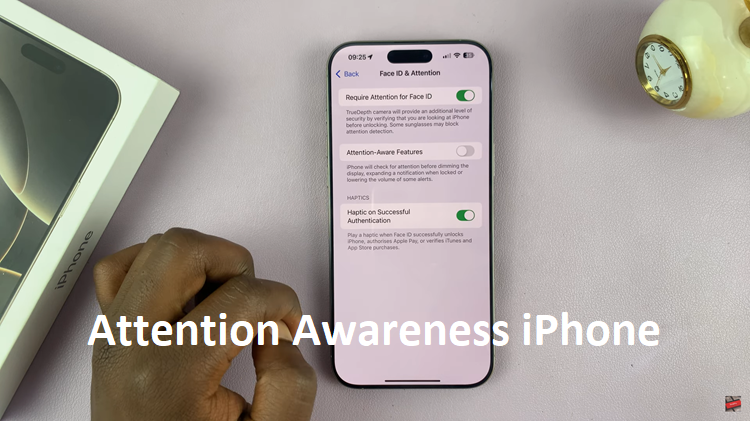
Apple is known for its attention to detail. From the design of its hardware to the smallest iOS features, everything feels purposeful. Yet, one iPhone feature often goes unnoticed despite being incredibly smart — Attention Awareness. If you’ve ever wondered why your iPhone dims automatically when you’re not looking at it, or why Face ID doesn’t unlock when your eyes are closed, you’ve already experienced this feature in action.
In this article, we’ll dive deep into what Attention Awareness is, how it works, why it matters, and how you can control it. Even if you’re not a tech expert, you’ll walk away with a full understanding of how this little-known feature improves both convenience and security on your iPhone.
What Is Attention Awareness on iPhone?
Apple introduced Attention Awareness iPhone with the launch of the iPhone X in 2017, the first iPhone equipped with Face ID and the TrueDepth camera system. This feature uses advanced facial recognition technology to determine whether you’re actively looking at your device.
At its core, Attention Awareness is designed to make your iPhone smarter and more intuitive. It monitors where your eyes are focusing, and based on that, it can make subtle adjustments to the way your phone behaves. For instance, if you’re reading something on your phone, it prevents the screen from dimming. Similarly, if you’re not paying attention, it can lower the volume of alerts or prevent Face ID from unlocking the device.
The technology is subtle — so much so that most users don’t even realize it’s working in the background. It’s not about spying or tracking; it’s about creating a seamless and responsive experience that reacts naturally to human behavior.
How Does Attention Awareness Actually Work?

Under the hood, Attention Awareness iPhone relies on the TrueDepth camera system — the same hardware that powers Face ID. This system includes a combination of sensors, infrared cameras, and dot projectors that map your face in 3D. When Attention Awareness is enabled, these sensors check for specific cues that indicate whether your eyes are open and directed at the screen.
What’s impressive is how efficient this process is. The iPhone doesn’t record or store video of your face for this feature. Instead, it performs real-time analysis using secure, on-device processing. The data never leaves your iPhone, which means your privacy is fully protected.
When you look at your phone, the feature tells iOS, “Yes, the user is paying attention.” That triggers smart responses: the screen stays bright, notifications may appear, and Face ID unlocks seamlessly. But when your Attention Awareness iPhone drifts away — say, when you’re in conversation or looking elsewhere — the phone detects that too, dimming the display or quieting alerts. It’s a small touch, but one that makes daily use feel smoother and more human-centered.
Everyday Scenarios Where Attention Awareness Makes a Difference
You might not consciously think about Attention Awareness iPhone but you’ve likely benefited from it without realizing. Here are a few examples of how it enhances everyday iPhone use Preventing Accidental Unlocks
If someone tries to unlock your phone while you’re asleep or looking away, Face ID won’t work. That’s because Attention Awareness ensures your eyes are open and directed at the device. It’s a simple yet powerful layer of protection against unauthorized access Smarter Screen Dimming
You know that frustrating moment when your phone dims while you’re still reading? With Attention Awareness, that doesn’t happen. The feature detects when you’re looking at the display and keeps it bright until you look away Quieter Notifications
When the iPhone detects that you’re not paying Attention Awareness iPhone , it can automatically lower the volume of notifications and alerts. This prevents unnecessary interruptions when your focus is elsewhere — for example, during a meeting or while you’re watching TV.
Each of these small conveniences adds up to a smoother, more thoughtful user experience that feels personalized and responsive without being invasive.
Privacy and Security: How Apple Protects Your Attention Data
Any time a feature involves cameras or sensors, users naturally wonder about privacy. Apple, however, has built its reputation on strong data protection principles — and Attention Awareness iPhone is no exception.
The system processes all visual data locally on your iPhone. None of the information about your gaze or attention is sent to Apple servers or shared with apps. In other words, the TrueDepth camera is looking for signals, not recording content.
Apple’s emphasis on on-device machine learning means that your iPhone does the heavy lifting of recognizing whether you’re looking at the screen — instantly and securely. No data leaves your phone, and no external server is involved. This ensures that your personal Attention Awareness iPhone patterns remain private and inaccessible to anyone else, including Apple itself.
This approach aligns with Apple’s overall philosophy: “What happens on your iPhone stays on your iPhone.” It’s one of the reasons the company has maintained user trust even as it continues to introduce new, sensor-based features.
How to Enable or Disable Attention Awareness
Not everyone wants every smart feature active all the time — and Apple understands that too. You can easily turn Attention Awareness iPhone on or off through your iPhone’s settings.
Here’s how Open Settings.Go to Face ID & Passcode (you’ll need to enter your passcode) Scroll down to find Attention Aware FeaturesToggle the switch on or off depending on your preference.
When the feature is disabled, your iPhone won’t check for eye contact before unlocking with Face ID, dimming the screen, or adjusting alert volume.
If you’re someone who values automation and convenience, keeping it on makes sense. But if you prefer manual control or find the feature unnecessary, turning it off won’t affect Face ID’s accuracy — it just won’t rely on Attention Awareness iPhone detection.
Attention Awareness vs. Face ID: What’s the Difference?
A common misconception is that Attention Awareness iPhone is Face ID, but that’s not quite accurate. Face ID is primarily about authentication — verifying your identity. Attention Awareness, on the other hand, is about context — understanding whether you’re engaged with the device.
Think of it like this Face ID asks: “Is this the right person Attention Awareness asks: “Is this person actually looking?”
They work together, but they serve different purposes. You could have Face ID enabled without using Attention Awareness iPhoneor vice versa (though the latter isn’t common). Together, they make your iPhone more secure and intuitive, reducing accidental unlocks and unnecessary interactions.
Why Attention Awareness Reflects Apple’s Design Philosophy
Apple’s goal has always been to create technology that “just works.” Attention Awareness iPhone embodies that philosophy perfectly — it’s invisible, effortless, and user-focused. You don’t have to toggle anything in your daily life or think about it consciously.
It’s part of a broader design trend at Apple: human-centered computing. Rather than forcing users to adapt to the device, Apple designs the device to adapt to the user. From adaptive brightness to haptic feedback, every interaction feels like a natural extension of human behavior.
In that sense, Attention Awareness isn’t just a security feature — it’s a small example of how technology can become more empathetic. It respects your Attention Awareness iPhone , saves your time, and adds convenience without compromising privacy.
Final Thoughts: The Subtle Power of Attention Awareness
While it might not be as flashy as new camera modes or dynamic island animations, Attention Awareness iPhone is one of those subtle innovations that makes iPhones feel alive. It blends hardware, software, and human psychology in a way that feels effortless.
In a world where screens are constantly demanding our focus, it’s refreshing to see technology that respects it instead. Whether it’s keeping your display bright when you need it or ensuring no one unlocks your phone while you’re asleep, Attention Awareness represents Apple at its best — thoughtful, secure, and seamlessly integrated.
So next time your iPhone dims when you look away or stays bright while you’re reading, remember — that’s not magic. That’s Attention Awareness iPhone quietly doing its job.